Battery Storage Installation

Battery Storage Installation in San Jose

A home battery can keep selected circuits running during an outage, store solar for later use, or shift when the home draws grid power. Start with the loads that matter, the equipment already at the house, and the backup boundary you want.

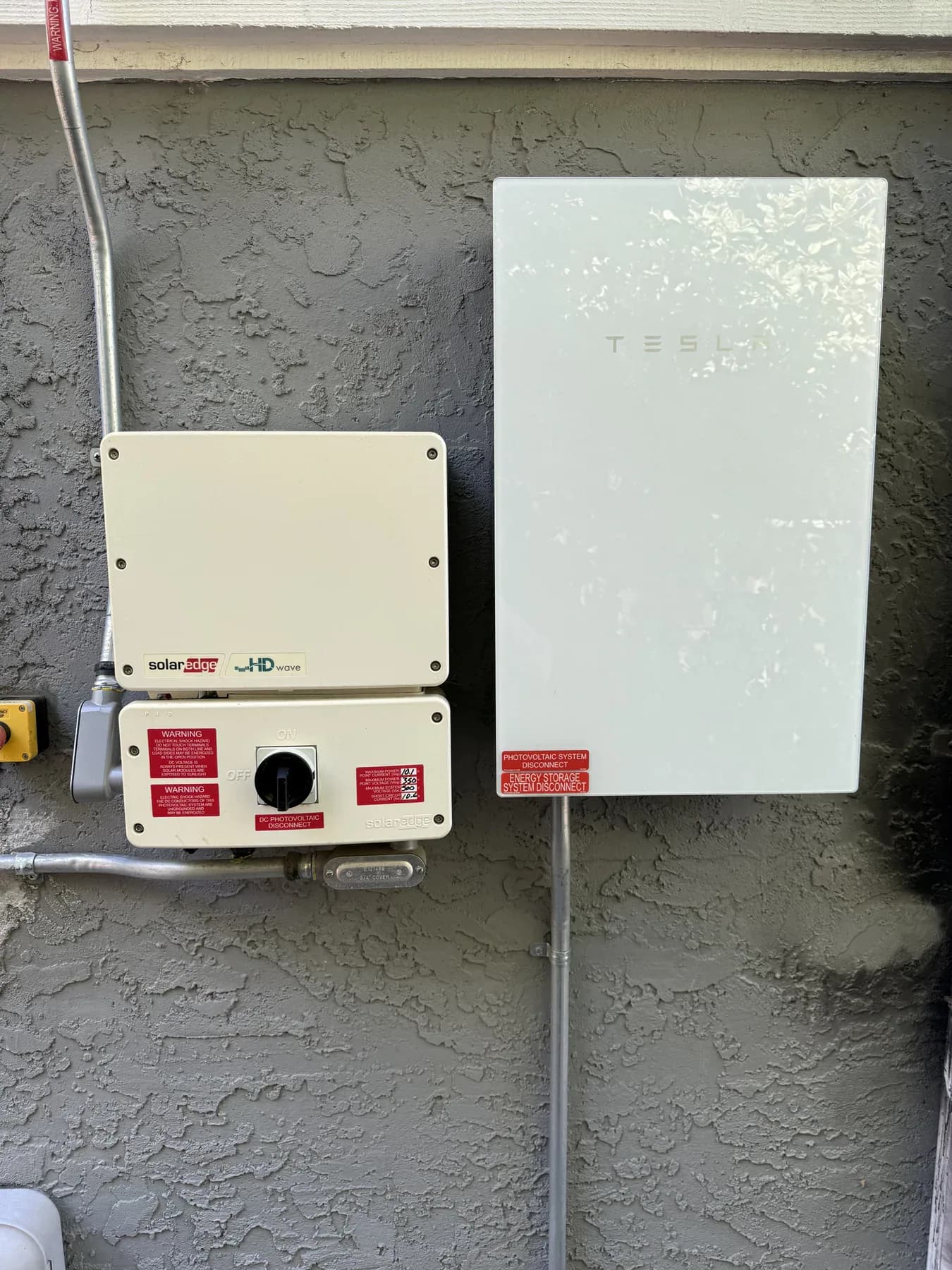
Tesla backup-system equipment beside a SolarEdge inverter
CRE field photo · Tesla backup-system equipment beside a SolarEdge inverter

Plan the work

Essential circuits

Protect the loads that matter most

Define refrigeration, lighting, internet, medical equipment, or other priorities before choosing a backup configuration.

  • List essential loads and their expected use.
  • Keep selected-circuit backup distinct from whole-home goals.
  • Review starting loads as well as ordinary use.
Solar and storage

Fit storage to existing generation

Existing solar, inverter architecture, and the desired operating mode affect the system discussion and PG&E process.

  • Document existing solar equipment.
  • Discuss backup and self-powered priorities.
  • Confirm interconnection requirements for the configuration.

Equipment location

Plan the route and site

The battery, service equipment, backup controls, and conduit route need a site-specific layout.

  • Review accessible wall or pad locations.
  • Consider meter, panel, and equipment distances.
  • Confirm local approval requirements before work.

What a home battery can back up

PG&E explains that home battery systems may be set up to back up selected rooms and appliances rather than every load in the house. During an outage, the system disconnects from the grid and supplies the circuits included in the design. How long those loads run depends on battery size, the energy being used, and whether solar can recharge the system.

That makes an outage-priority list more useful than a universal “whole-home” claim. Refrigeration, lighting, Wi-Fi, medical equipment, pumps, HVAC, and cooking equipment can have very different power demands. We use the list to identify the needed backup scope and whether a conventional essential-load arrangement or broader power-management approach is worth evaluating.

Storage can serve more than one goal

Battery apps commonly offer backup, bill-savings, self-powered, and grid-support modes. The available choices and their names vary by manufacturer and utility program. A homeowner should decide whether resilience, using more onsite solar, reducing grid use at certain times, or participating in a program is the priority before comparing equipment.

No operating mode guarantees savings or a particular outage duration. Usage patterns, the electric rate, solar production, weather, battery settings, and the final approved configuration all matter. We describe the practical tradeoffs in the proposed scope instead of promising a payback period.

PG&E interconnection and approvals

PG&E treats storage devices as generators for Rule 21 interconnection purposes. Its NEM materials identify paired-storage support for qualifying systems, and the final path depends on the system and existing solar agreement. The local jurisdiction also determines permit and inspection requirements for the address.

A proposal should identify the equipment layout, backup boundary, assumptions about the service and existing solar, and the steps that depend on utility or jurisdiction review. Approval timing is not fixed, and a system should not be represented as ready for operation before the required approvals are complete.

Battery, generator, and smart-panel decisions

A battery stores electricity and can be paired with solar. A standby generator uses a fuel source and transfer equipment. A smart panel can add circuit visibility and, in some configurations, load management. These can be related but they answer different resilience questions.

The site review can separate equipment that is needed now from options that support later electrification. If the existing main equipment needs work, that is a capacity and distribution decision with its own scope.

Prepare for a battery assessment

Share recent utility usage, any solar documents, a list of priority loads, and photographs of the meter, service equipment, and potential equipment locations. Note planned EV charging, HVAC changes, or renovations.

That information helps establish a useful first discussion. The final design follows the actual service, equipment compatibility, approved location, and the property’s permit and utility requirements.

Plan backup power around the rooms you use.

Pick the rooms and everyday essentials you want to keep available. We’ll use this as a starting point for your backup plan.

Add a room

Whole-home needs

Wi-Fi is counted once for the home. Larger equipment needs a site review.

How long would you like backup power?
Add a room or choose a whole-home need to begin.

We’ll review your choices and size your backup.

Nothing is sent until you submit the form.

How we estimate this

We have not shown a total for the selected equipment. Choose a duration and an item with a sample number, or let us review equipment that needs a closer look.

Our sample numbers are: Fridge 100 W for about half the time, Wi-Fi 60 W, lights 25–40 W for part of the time, a laptop 65 W, a monitor 35 W, and small electronics 30 W. Solar, startup demand, and whether equipment works with a specific battery are not included.

Start with the loads that matter during an outage

A documented backup priority list connects battery selection to the equipment the household needs during an outage.

  1. Review loads and equipment

    Document outage priorities, service equipment, existing solar, and planned electrification.

  2. Define the system boundary

    Choose the backup scope, location, and equipment path that fit the home.

  3. Coordinate approvals

    Plan jurisdiction and PG&E requirements for the approved configuration.

Common questions

Can a battery back up my entire home?

Some designs can cover more loads than others, but backup scope depends on the system, service, and load review. Most home battery systems back up selected circuits.

Can I add storage to existing solar?

Often that is possible, but the solar equipment, configuration, and PG&E interconnection path need review.

How long will backup last?

Runtime depends on battery capacity, the loads being used, and whether solar can recharge the battery during the outage.

Do I need a smart panel?

Not every battery project does. A smart panel is a separate circuit-management option to evaluate against the desired backup scope.

Help with the cost.

Check the electricity provider on your bill, then look at the programs below. Eligibility depends on your home, equipment, and project. Confirm funding and any required approval before work starts.

Program details checked September 17, 2026.

PG&E customers • Eligibility and available funding vary

California battery assistance through SGIP

Rebate depends on the program you qualify for

PG&E lists a general rebate around 15% of installation cost, with greater help for qualifying resilience needs. An approved contractor must confirm eligibility and reserve funds. Participation in a program that shifts electricity use is required. Solar customers should review any required billing-plan change before applying.

Check rebate rules and how to apply

City of Santa Clara • Silicon Valley Power customers

Battery rebate with solar

Up to $2,700, with possible income-qualified bonuses

SVP pays $150 per kilowatt-hour for an eligible battery connected to existing or new solar. The system must be at least 3 kWh. Permit, utility approval, and paid invoices are required. Submit within 60 days of purchase or the final permit date.

Check rebate rules and how to apply

San José Clean Energy customers

Rewards for sharing stored power

Enrollment bonus up to $240, plus ongoing rewards

Peak Rewards pays owners of eligible connected batteries for allowing scheduled battery use. This is an operating reward, not an installation rebate. The battery cannot already be enrolled in another demand-response or virtual power plant program.

Check eligible batteries and enrollment

San José Clean Energy’s EcoHome battery rebate closed to new applications on July 1, 2026. Previously reserved projects follow their existing terms. Read the closure notice.

PG&E’s separate Residential Solar and Storage Equity rebate is currently waitlist-only. Check waitlist information.

Tell us about your project.

Share your city, the work you need, and any equipment or plans you already have.

408-614-4451
Loading the inquiry form…
Call (408) 614-4451Request an estimate